Symmetrix
Direct Matrix (DMX) Architecture is a new storage array technology that employs
a matrix of dedicated, serial point-to-point connections instead of traditional
buses or switches.
Symmetrix
Evolution.
Symmetrix
2
Symmetrix
3
Symmetrix
4
Symmetrix 4.8
Symmetrix
5
Symmetrix
5.5
Symmetrix
6-DMX
Symmetrix
6.5 –DMX 2
Symmetrix
7 –DMX 3
DMX-3
950
DMX 4
DMX 3
Specifications.
Number
of disks : 96-240 (1DA) 48-2400(4DA)
Memory
Directors :
2-8 4-8
Max
global memory : 64GB 256GB
FC : 48 64
MAX
TB raw : 119 1053
Drives
supported: 73,146,300,500 GB
[Front
end directors :8,Back end directors :8,8 global memory boards-512GB raw,256GB
mirrored,1920 FC drives,2400 via RPQ]
DMX3
and DMX4 supports a max of 10 storage bays ,with an RPQ for 11 th storage
bay.The DAE’s in 2a and 2b are daisy chained to to those in bay 1a and 1b.
Symmetrix Basic architecture :
Front
end :Host adapter: Channel adapter :Channel director
Memory : Cache Memory
Back
End : Disk adapter or Disk Director
Each
Front end has four independent processors or slices.
Host
Director and adapter pairs:
Normally
channel directors are installed in pairs ,providing redundancy and continuous
availability in the event of repair or replacement to any one channel director.
Disk
Directors and adapter Pair:
DA’s
are also installed in pairs in the card cage and provide primary path to some
drives and alternate path to others .
On DA
dynamic sparing is enabled; this feature maximizes data availability by
diagnosing Marginal media errors before data becomes unreadable.
Starting
with DMX 3 cache is mirrored and therefore always installed in pairs.
Symmetrix DMX2000/3000
Functional Diagram
Front-end Channel Back-end Disk
Directors Directors
The DMX Series models’ functional block diagram displays
hosts connected to the back adapters of the front-end directors; they send
their data to the Symmetrix DMX Series system’s cache. The new
Point-to-Point matrix connection between cache and back-end disk directors
allows for high performance destaging to the drives, or retrieval of data from
the disks into cache. Besides the Disk Adapters and drives, the back-end has a
new control card, called a Port Bypass Card (PBC).
In the Direct Matrix Architecture, contention is minimized
because control information and commands are transferred across a separate and
dedicated message matrix that enables communication between the directors,
without consuming cache bandwidth
Direct Matrix
Architecture
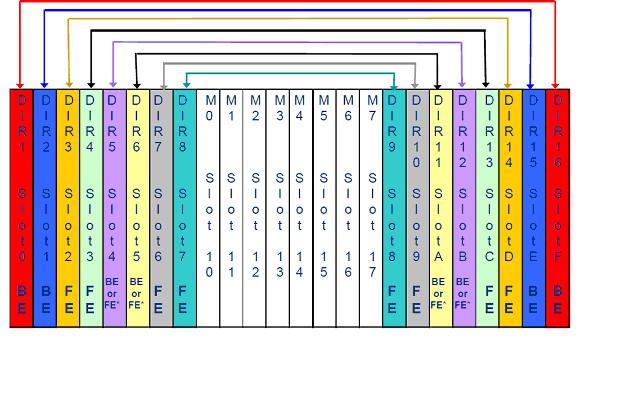
Symmetrix Director
Pairing
Director
pairing, along with dual ported drives and the use of the Port Bypass Cards,
now provides redundancy for a disk drive failure. Disk director pairing starts
from the outside and works toward the center of the card cage. Directors are
paired processor to processor using the rule of 17.
Notice
in the diagram above, directors 1 and 16 are paired and directors 2 and 15 are
paired. Front end director pairing configuration is recommended, but not
required
The
Port Bypass Card contains the switch elements and control functions to allow
intelligent management of the two FC-AL loops embedded in each disk cage
midplane. There are two Port Bypass Cards per disk cage midplane. Each disk
cage midplane can support 36 Fibre Channel drives. Each Processor has two
ports, each with devices in the Front, as well as in the Back, Disk Midplane.
In
the above slide, only one port from
Director 1d, and one port from Director 16d. Notice that each director has the
potential to access all drives in the loop (9-drive loop configuration in this
example). Also notice that using the Port Bypass Card, each director is
currently accessing only a portion of the drives (Director 1d has 4 drives;
Director 16d has 5 drives). These directors will have an opposite configuration
on their second port, which is connected to a different Port Bypass Card and
Disk Midplane.
For
example, Director 1d has 4 drives in this Disk Midplane, and on its other port
it will have 5. Director 16d has 5 drives in this Disk Midplane, and on its
other port it will have 4. Director 1d and Director 16d will be paired in both
the Front and Back Disk Midplanes (only one shown here).
With
no component failure, each processor will manage 4 drives on one port and 5
drives on the other. These reside in Front and Back Disk Midplanes and are
referred to as C and D Devices. If the processor on Director 1d fails, the
processor on Director 16d will now access all 9 drives on this loop.
Symmetrix
DMX back-end employs an arbitrated loop design and dual-ported disk drives.
Here is an example of a 9 disk per loop configuration with 4 disks per loop.
Each drive connects to two paired Disk Directors through separate Fibre Channel
loops. Port Bypass Cards prevent a Director failure or replacement from
affecting the other drives on the loop. Directors have four primary loops for
normal drive communication and four secondary loops to provide alternate paths
if the other director fails
Symmetrix Global Cache
Directors
Memory boards are now referred to as Global Cache Directors and contain global shared memory.Boards are comprised of memory chips
and divided into four addressable regions.Symmetrix has a minimum of 2 memory
boards and a maximum of 8. Generally installed in pairs Individual cache
directors are available in 2 GB, 4 GB, 8
GB, 16 GB and 32 GB sizes. Memory boards are Field Replaceable Units and “hot swappable”
Symmetrix
Enginuity is the operating environment for the Symmetrix DMX systems. Enginuity
manages all Symmetrix operations from monitoring and optimizing internal data
flow, to ensuring the fastest response to the user’s requests for information,
to protecting and replicating data.
EMC’s
solution enabler APIs are the storage management programming interfaces that
provide an access mechanism for managing the Symmetrix third-party storage,
switches, and host storage resources. They enable the creation of storage
management applications that don’t have to understand the management details of
each piece within the total storage environment. Symmetrix DMX systems support
platform software applications for data migration, replication, integration and
more
Each processor in each director is loaded with Enginuity
Eg: 57 75
50 : Symm 3
52 : Symm 4
55 : Symm 5
56 : DMX /DMX2
57: DMX3/DMX4
Second is the microcode Family ,Major release.
Symmetrix Logical Volumes are configured using the service processor
and SymmWin interface/application
* Generate configuration file (IMPL.BIN) that is downloaded
from the
service processor to each director
Symmetrix Logical
Volume Types
Open Systems
hosts use Fixed Block Architecture (FBA)
Each block is a fixed size of 512
bytes
Volume size referred to by the number of
Cylinders
Each Cylinder
has 15 tracks
Each track has
64 blocks of 512bytes
Mainframes use Count Key Data (CKD)
Count field indicates
the data record’s physical location (cylinder and head)
record number, key
length, and data length
– Key field is optional and contains information used by the
application
– Data field is the area which contains the user data
Symmetrix stores data in cache in FBA and CKD and on
physical
disk in FBA 512 format
Symmetrix
physical disks are split into logical hyper volumes. Hyper volumes (disk
slices) are then defined as Symmetrix logical volumes. A Symmetrix logical
volume is the disk entity presented to a host via a Symmetrix channel director
port. As far as the host is concerned, the Symmetrix logical volume is a
physical drive.
From
the Symmetrix perspective, physical disk drives are being partitioned into
hyper volumes. A hyper volume could be used as an unprotected Symmetrix logical
volume, a mirror of another hyper volume, a Business Continuance Volume (BCV),
a member for Parity RAID, a remote mirror using SRDF, and more.
Host-based
logical volumes are different than Symmetrix volumes and are configured by
customers through Logical Volume Manager software
(e.g.
Veritas LVM or NT Disk Administrator).
How do Symmetrix Logical Volumes Appear to a Host?
Symmetrix Logical
Volumes are viewed by the hosts as disk devices
Host is unaware of
protection or other Symmetrix attributes
Unix hosts access
disk through device special files
Many hosts use CTD
(Controller-Target-Device) format
Example
/dev/rdsk/c1t1d2
(Controller
target LUN)
Other UNIX hosts
assign logical names to disk devices
Example IBM-AIX uses hdisks (/dev/hdisk2)
NT
accesses disk devices through a PHYSICALDRIVE name
Data Protection
Mirroring (RAID 1)
– Highest performance, availability and functionality
– Two hyper mirrors form one Symmetrix Logical Volume
located on separate
physical drives
Parity RAID
3 +1 (3 data and 1
parity volume) or 7 +1 (7 data and 1 parity volume)
Raid 5 Striped RAID
volumes
– Data blocks are striped horizontally across the members of
the RAID group
( 4 or 8 member
group); parity blocks rotate among the group members
RAID 6 (6+2 ) or (14+2)
RAID 10
Mirrored Striped Mainframe Volumes
Dynamic and Permanent Sparing
SRDF (Symmetrix Remote Data Facility)
Mirror of Symmetrix
logical Volume maintained in a separate Symmetrix
Max hyper volumes /disk varies with software version(255 for
5771)
Timefinder
is a family of products that provide local replication.
Timefinder/Mirror-
Timefinder business continuous volumes (BCV) are full physical copies and
appear as a mirror of the standard device ,they can be used to increase
availability by servicing I/O if the source volume and the source volumes’s
protection are destroyed
Symmetrix Director
Configuration Information
SymmWin
is a graphics-based tool for configuring and monitoring a Symmetrix system.
Symmetrix
configuration information includes physical hardware that is installed, the
number and type of directors, memory size, and mapping of addresses to
front-end directors along with operational parameter bit settings for front-end
director adapter to host connectivity. Configuration information created with
SymmWin GUI is stored in the IMPL.bin file.
Both
Channel and Disk directors have a local copy of the configuration file stored
in EEPROM. This enables Channel Directors to be aware of the Disk Directors
that are managing the physical copies of Symmetrix logical volumes and vice
versa. The IMPL.bin file also allows Channel Directors to map host requests to
a channel address, or target and LUN to the Symmetrix logical volume. Changes
made to the bin file must first be made to the IMPL.bin on the Service
Processor and then downloaded to the directors over the internal Ethernet LAN.
Configuration changes can also be made using EMC ControlCenter Configuration
Manager GUI and Solutions Enabler CLI
Data
vaulting is a new feature only available with DMX-3. As cache size, disk size
and power requirements increase, the time required to destage data increases.
Power vault was designed to limit the time necessary to power off the box on
battery power. Power Vault will save global memory to specific vault devices on
power down, then, on power up, the data will be loaded to cache so that it may
be destaged to the correct location.
Service processor:
Used
as interface to the symmetrix for use by local engineer.
DMX-3
and above uses a rack mounted server with KVM& UPS
Runs
Symmwin application
Used
to configure symmetrix,run diagnostics and maintenance activities
IMPL.bin
File:
It
contains the configuration information for a symmetrix.
The
file defines the
Physical
hardware configuration
-Directors
-Memory
-Physical
Drives
Logical
Storage configuration;
Emulation,number
,size and data protection schemes for logical volumes.
Operational
parameters and features.
Located
on each director and in SP
Gatekeeper
Device
Gatekeeper
volumes act as command pass thru devices
Gatekeepers
are used by open systems hosts.
Typically
small.
6
cylinders seems to be appropriate for most environments.
symcli
–v provides the version number and a brief description of the available
commands .
We
need to initialize the symapi database before using the SYMCLI commands ,this
is done using the symcfg discover command.
symcfg list –v
will display the verbose info about the configuration.
symcfg list –v | more
symcfg list –dir ALL ( all directors)
symcfg
–da all list (backend directors)
symcfg
–sa all list (frontend directors)
symcfg
–fa 07a –v list (more detailed info about one front end director )
o/p
number of director ports= 2( 2 ports /processor)
symcfg
list –memory
symdisk list –v | more
symdev
list
symdev
show 7c| more