Wednesday, June 6, 2012

DMX-4 Interview Questions (Which I got from Net, tried to answer some of them)


 1.How many Cache directors, Front-end directors and Back-end directors we can use    in    DMX-4?

 Cache directors -8
 Front-end directors -8
 Back-end directors -8

2.What are the different types of Front-end directors and the purpose of each one?

  Mainframe CKD devices:
    ESCON (EA)
    FICON (EF)
 Open Systems FBA
      Fibre channel (FA)
      ISCSI (SE)  etc

3.What are the Management Tools for DMX?

EMC Control Center (ECC)
SMC
EMC Solutions Enabler
EMC Symmetrix Performance Analyzer

4.What are the major components of System Bay and Storage Bay?

System Bay:

Directors and Memory boards, FANS, KVM, SPS, UPS, Power Supplies, XCM boards

Storage Bay

DAEs, BBU (Battery Backup Unit),SPS,LCC Link control card
       
5.Explain Enginuity Operation layers
     
         Symmetrix-Based Application
         Host-Based Symmetrix Application                    -1
         Independent Software Vendor Application

          EMC Solutions Enabler API       -2

          Symmetrix Enginuity Operating Environment  Functions  -3

          Symmetrix Hardware  -4

6.How do you calculate number of cylinders for 50GB LUN?

   15 tracks -1 cylinder
   64 blocks – 1 track
   512 bytes-1 block
   1024= conversion of bytes to kb to mb to GB
   GB=cylinder *15*128*512/1024/1024/1024-DMX3 DMX4 VMAX
   GB=cylinder *15*64*512/1024/1024/1024 -DMX DMX2

    so 54613.3 cylinders.

7.How do you add a new member to the existing Meta?

  symconfigure –sid 1234 –cmd “add dev X to meta Y”; commit

8.Briefly explain the DMX-4 supported Device types?

Mainframe and Open systems devices

9. What are the RAID levels DMX-4 Supports?

RAID 0, RAID 1, RAID 5, RAID 6, RAID 1/0

10.How do you check the failed disks in the Symmetrix Array?

 C:\Program Files\EMC\SYMCLI\bin>symdisk -sid 2258 -failed list

Symmetrix ID                 : 00019010XXX8

No devices were found

C:\Program Files\EMC\SYMCLI\bin>

11.Can windows, Linux, Solaris share the same FA in DMX?

 Yes

12.Host is unable to see the storage, what may be the problem?

 Host WWN issue, Zoning issue, switch port failure, connectivity issue, SAN disk issue

13.What is VCMDB and How do you take the backup?

The Symmetrix Volume Configuration Management (VCM) database stores access configurations that are used to grant host access to logical devices in a Symmetrix storage array. The VCM database resides on a special system resource logical device, referred to as the VCMDB device, on each Symmetrix storage array.

Information stored in the VCM database includes, but is not limited to:
Host and storage World Wide Names
SID Lock and Volume Visibility settings
Native logical device data, such as the front-end directors and storage ports to which they are mapped
Masking operations performed on Symmetrix storage devices result in modifications to the VCM database in the Symmetrix array. The VCM database can be backed up, restored, initialized and activated. The Symmetrix SDM Agent must be running in order to perform VCM database operations (except deleting backup files).

Backup the VCM database
      # symmaskdb backup


14. What is stripping and what is Concatenating?

    Concatenating- First byte of data at the beginning of the first device and addressing   continues to the end of the first device before any data on the next device is referenced.

 Stripping-divides the data to a series of stripes.


15. What is Read Hit and Delayed fast write?

Read Hit
In a Read hit operation, the requested data resides in global memory. The channel director transfers the requested data through the channel interface to the host and updates the global memory directory. Since the data is in global memory, there are no mechanical delays due to seek and latency

Delayed fast Write
A delayed fast write occurs only when the fast write threshold has been exceeded. That is, the percentage of global memory containing modified data is higher than the fast write threshold. If this situation occurs, the Symmetrix system disconnects the channel directors from the channels. The disk directors then destage the Least Recently Used data to disk. When sufficient global memory space is available, the channel directors reconnect to their channels and process the host I/O request as a fast write. The Symmetrix system continues to process read operations during delayed fast writes. With sufficient global memory present, this type of global memory operation rarely occurs

16. What are the Symmetrix Business Continuity Tool

Time finder

SRDF

17. By using what symcli command we can check the HBA details and physical details

     symmask list hba                   –list local host hba details
     symmask –sid  1234 –wwn wwn list logins
     symmaskdb –sid 1234 –host name list capcity (not in VMAX)

18. How do you list the Hosts which are connected to particular director port?

    symamsk –sid 1234 list logins –dir 10e  –p 1

19. How do you check the total allocated storage of a Host?

    Symmaskdb –sid 1234 –host name list capacity

20. What is the purpose of bin file in SAPAPI database?

  It contains the configuration information for a symmetrix.
    The file defines the
                   Physical hardware configuration
-Directors
-Memory
-Physical Drives
      
 Logical Storage configuration;

Emulation,number ,size and data protection schemes for logical volumes.

Operational parameters and features.

Located on each director and in  SP

21. What is pre check list to assign to storage to the host?

    Host WWN details.

    Host and SAN connectivity to Fabric Switch

    Type of storage needed(Tier 1,Tier2 ,Tier3 )

    Size of the LUN

22. How do you check the login hosts in the Array?

    symmask –sid 1234 list logins

23. Explain Rule 17 in DMX?

Rule 17 is mainly for DA, Director pairing, along with dual ported drives and the use of the Port Bypass Cards, now provides redundancy for a disk drive failure.Directors are paired processor to processor using the rule of 17.Directors 1 and 16 are paired and directors 2 and 15 are paired. The same concept is followed on FA even if it is not mandatory. Normally channel directors are installed in pairs ,providing redundancy and continuous availability in the event of repair or replacement to any one channel director.
So by making the directors in sum of 17, both the directors would fall under different power zone and if one goes down also the data to be served.


What is the FAN-IN and FAN-OUT ratio of DMX-4?

What is the maximum hyper size in DMX-4?

 How many hypers can create in a Single disk?

How many members can contain in one meta?

 How many LUN IDs available per port?

What Dynamic LUN addressing?

What are the DMX-4 supported disk types, no. of disks and maximum capacity?

What are Vault drives and Hot Spare?

What is Preview, Prepare and Commit while using Symconfigure command?

How do you check the back-end Operations on Symmetrix Array?

What are the service states of a device

How do you reserve the devices?

What is Tiering and how do you create the Disk Groups

How do you check the free space by Disk group and Array as whole?

How do you check the particular disk is connected to which DA Port and it is resides in particular DAE?

What is drive looping?

How do you check the particular device is connected to which Host?

How do you check the number of storage bays connected to the system bay and number of disks in each storage bay?

How do you check the devices which are mapped to FA but not masked to any host?


Explain step by step to provide storage to the Host?

What is Thin Provisioning?

 How do you create thin pools and thin devices?

 What are the steps for storage reclamation?

  How many mirror positions RAID-1 and RAID-5 will occupy?

  How do you increase the mirror positions?

How do you convert the One device type to another?

 What is FA Port Flag and how do you set the FA port flags?

How do you setup the Symmetrix metrics?

How do you check the configured environmental variables?

What are the External locks and how to check?

How to monitor performance of EMC Symmetrix?

How do you check performance statistics of a particular director port?

How do you check the cache activity of selected front-end directory?

How do you check the back-end I/O requests of selected disk?

What are the available performance information types in SYMSTAT command?

What is symmetrix optimizer and how it works?

What is Symmetrix QoS and how it works?

What is the purpose of Symmetrix Change Tracker?

 What is Dynamic Cache Partitioning?

What are the logs available at host-end and on symmetrix array?

 How do you monitor the real time events on symmetrix array with example?

How do you track the history of events on symmetrix array with example?

 How do you check the audit logs on symmetrix array?

 How do you activate the auditing on symmetrix array?

What is Symmetrix ACL?

Explain step by step to setup the access controls on symmetrix array?

 How do you take the backup of ACLs?

What is Symmetrix User Authorization?

Explain step by step to setup user authorization on symmetrix array?

 How do you perform backup and restore user authorization information?

What are the services of symcli?

Explain step by step procedure to setup new host?

What are the Symcli Base Management Commands?

How do you prepare the Storage Capacity planning reports by host wise?

SAN Fabric Questions

SAN Interview Questions

·         What is zoning?

·         What is hard and soft zoning and Explain?

·         What is the difference between zone and zone set?

·         Explain step by step procedure for creating soft zoning?

·         Explain step by step procedure for creating hard zoning?

·         What is VSAN and how to create?

·         What is ISL?

·         What is F,E and FL Port?

·         What are the management tools for Switches?

·         How do you troubleshoot the SFP failure?

·         How do you upgrade the firmware?

·         What are the general switch problems?

Symmetrix Mangement tools


EMC Control Center (ECC) is what we know as the mother of all Storage Management software. While you can use Navisphere to manage CLARiiON storage, you can also have ECC connnect directly to CLARiiON storage and perform simple storage provision activites, among other functionalities. It is very different from Navisphere and has it's own quirks and other functionality. You can have it manage other storage lik Symmetrix, Celerra, HDS, NetApps etc - although except for Symmetrix you are limited to rather basic storage provision / management features compared to using natively available management tools. However what ECC excels in is apart from having a single user interface to manage them all - Storage, SAN Switches, Backups, is the Notifications and Alerts features.

EMC Solutions Enabler is software that provides a host with SYMAPI (Symmetrix Application Programming Interface), It provides a specialized library of UNIX-formatted commands, and supports command line entries and scripts to perform configuration, control, and management operations on devices and data objects in EMC storage environments. Solutions Enabler software supports both open systems and mainframe operating systems.
Symmetrix Management Console (SMC) is a browser-based user interface designed for configuring and managing Symmetrix arrays. It was developed to concurrently support all the features of Enginuity Version 5671 and later.

EMC Symmetrix Performance Analyzer (SPA) is a browser-based tool used to perform historical trending and analysis of Symmetrix array performance data. SPA was developed to work with the Symmetrix Management Console (SMC).

Clariion Interview Questions


Clariion Interview Questions-Answer it soon.....
Explain Clariion architecture
Hardware Models of Clariion
What are the differences between Clariion CX-3 series and CX-4 Series
What are the Hardware components of Clariion
What are the management tools for Clariion
How to Initialize Clariion Array
What is Access Logix and How do you enable it?
Why Access Logix has to be enabled
What are Vault drives and how much capacity they use?
What is CMI? Clariion Message Interface
What are the I/O Operations in Clariion
Use of SPs
What is Storage array in Clariion?
Create Storage group
How to manually restore failed paths in Clariion
How do you gather SP Collects?
How do you upgrade the NaviSphere Manager?
What are steps to assign a LUN to existing Host?
Explain step by step procedure for storage provision to the new host?
How do create capacity planning reports in Clariion?
What is HEAT report?
How do you enter into the Engineering Mode and what are the activities we can perform in Engineering Mode?
How do you create a meta LUN?
Explain step by step procedure for LUN migration?
What is Private LUN Pool?
What is Reserved LUN Pool?
How do you deregister the hosts from NaviSphere?
How do you create a user and assign access rights?
How do you monitor Clariion alerts?
What is the recommended ration of Read and Write cache?

Comparison on DMX4 and VMAX


EMC Symmetrix DMX-4                          EMC Symmetrix V-Max
Called EMC Symmetrix DMX-4

Called EMC Symmetrix V-Max
DMX: Direct Matrix Architecture

V-Max: Virtual Matrix Architecture
Max Capacity: 1 PB Raw Storage

Max Capacity: 2 PB of Usable Storage
Max Drives: 1900. On RPQ: 2400 max

Max Drives: 2400
EFD’s Supported

EFD’s Supported
Symmetrix Management Console 6.0

Symmetrix Management Console 7.0
Solutions Enabler 6.0

Solutions Enabler 7.0
EFD: 73GB, 146GB, 200GB, 400GB

EFD: 200GB, 400GB
FC Drives: 73GB, 146GB, 300GB, 400GB, 450GB

FC Drives: 73GB, 146GB, 300GB, 400GB
SATA II: 500GB, 1000 GB

SATA II: 1000 GB
FC Drive Speed: 10K or 15K

FC Drive Speed: 15K
SATA II Drive Speed: 7.2K

SATA II Drive Speed: 7.2K
Predecessor of DMX-4 is DMX-3

Predecessor of V-Max is DMX-4
DMX-4 management has got a bit easy compared to the previous generation Symmetrix

Ease of Use with Management – atleast with SMC 7.0 or so called ECC lite
4 Ports per Director

8 Ports per Director
No Engine based concept

Engine based concept
24 slots

The concept of slots is gone
1 System bay, 9 Storage bays

1 System bay, 10 Storage bays
No engines

8 Engines in one System (serial number)
64 Fiber Channel total ports on all directors for host connectivity

128 Fiber Channel total ports on directors/engines for host connectivity
32 FICON ports for host connectivity

64 FICON ports for host connectivity
32 GbE iSCSI ports

64 GbE iSCSCI ports
Total Cache: 512GB with 256 GB usable (mirrored)

Total Cache: 1024 GB with 512 GB usable (mirrored)
Drive interface speed either 2GB or 4GB, drives auto negotiate speed

Drive interface speed 4GB
Green color drive LED means 2GB loop speed, Blue color drive LED means 4GB loop speed

Only 4GB drive speed supported.
Microcode: 5772 / 5773 runs DMX-4’s

Microcode: 5874 runs V-Max
Symmetrix Management Console is not charged for until (free) DMX-4

Symmetrix Management Console to be licensed at a cost starting the V-Max systems
Architecture of DMX-4 has been similar to the architecture of its predecessor DMX-3

Architecture of V-Max is completely redesigned with this generation and is completely different from the predecessor DMX-4
Microcode 5772 and 5773 has be build on previous generation of microcode 5771 and 5772 respectively

Microcode 5874 has been build on base 5773 from previous generation DMX-4


Largest supported volume is 64GB per LUN

Large Volume Support: 240GB per LUN (Open Systems) and 223GB per LUN (Mainframe Systems)
128 hypers per Drive (luns per drive)

512 hypers per Drive (luns per drive)
No Virtual Provisioning with RAID 5 and RAID 6 devices

Virtual Provisioning allowed now with RAID 5 and RAID 6 devices

DMX Platform Comparisons

Symmetrix VMAXSymmetrix VMAX SESymmetrix DMX-4Symmetrix DMX-4 950
Maximum Drives24003602400360
ArchitectureVirtual Matrix ArchitectureVirtual Matrix ArchitectureDirect Matrix ArchitectureDirect Matrix Architecture
Maximum Integrated Directors162N/AN/A
Connection TypesFC, FICON, Gigabit Ethernet, iSCSIFC, FICON, Gigabit Ethernet, iSCSIFC, FICON, ESCON, Gigabit Ethernet, iSCSIFC, Gigabit Ethernet, iSCSI
Maximum ConnectivityUp to 128 ports depending on connection type Up to 16 ports depending on connection type Up to 64 ports depending on connection type Up to 16 ports depending on connection type
Maximum SRDF Ports32 (FC or GbE SRDF ports)4 (FC or GbE SRDF ports)8 (GbE SRDF ports)8 (GbE SRDF ports)

Symmetrix and DMX –An over view


Symmetrix Direct Matrix (DMX) Architecture is a new storage array technology that employs a matrix of dedicated, serial point-to-point connections instead of traditional buses or switches.

Symmetrix Evolution.

Symmetrix 2

Symmetrix 3

Symmetrix 4

Symmetrix  4.8

Symmetrix 5

Symmetrix 5.5

Symmetrix 6-DMX

Symmetrix 6.5 –DMX 2

Symmetrix 7    –DMX 3

DMX-3 950

DMX 4

DMX 3 Specifications.


Number of disks        :    96-240 (1DA)       48-2400(4DA)
Memory Directors      :    2-8                         4-8
Max global memory   :   64GB                   256GB
FC                               :   48                          64
MAX TB raw             :   119                         1053

Drives supported: 73,146,300,500 GB

[Front end directors :8,Back end directors :8,8 global memory boards-512GB raw,256GB mirrored,1920 FC drives,2400 via RPQ]
DMX3 and DMX4 supports a max of 10 storage bays ,with an RPQ for 11 th storage bay.The DAE’s in 2a and 2b are daisy chained to to those in bay 1a and 1b.

Symmetrix Basic architecture :

Front end :Host adapter: Channel adapter :Channel director

Memory   : Cache Memory

Back End : Disk adapter or Disk Director


Each Front end has four independent processors or slices.

Host Director and adapter pairs:

Normally channel directors are installed in pairs ,providing redundancy and continuous availability in the event of repair or replacement to any one channel director.

Disk Directors and adapter Pair:

DA’s are also installed in pairs in the card cage and provide primary path to some drives and alternate path to others .

On DA dynamic sparing is enabled; this feature maximizes data availability by diagnosing Marginal media errors before data becomes unreadable.

Starting with DMX 3 cache is mirrored and therefore always installed in pairs.

 
Symmetrix DMX2000/3000 Functional Diagram


Front-end Channel                 Back-end Disk
Directors                                 Directors


The DMX Series models’ functional block diagram displays hosts connected to the back adapters of the front-end directors; they send their data to the Symmetrix DMX Series system’s cache. The   new Point-to-Point matrix connection between cache and back-end disk directors allows for high performance destaging to the drives, or retrieval of data from the disks into cache. Besides the Disk Adapters and drives, the back-end has a new control card, called a Port Bypass Card (PBC).
                           
In the Direct Matrix Architecture, contention is minimized because control information and commands are transferred across a separate and dedicated message matrix that enables communication between the directors, without consuming cache bandwidth
 

Direct Matrix Architecture

 
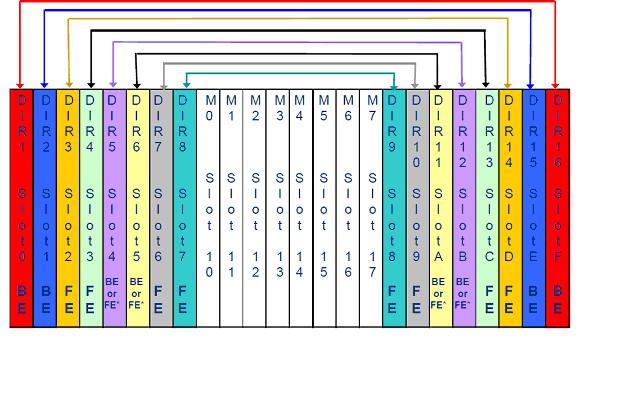
Symmetrix Director Pairing

Director pairing, along with dual ported drives and the use of the Port Bypass Cards, now provides redundancy for a disk drive failure. Disk director pairing starts from the outside and works toward the center of the card cage. Directors are paired processor to processor using the rule of 17.
Notice in the diagram above, directors 1 and 16 are paired and directors 2 and 15 are paired. Front end director pairing configuration is recommended, but not required


The Port Bypass Card contains the switch elements and control functions to allow intelligent management of the two FC-AL loops embedded in each disk cage midplane. There are two Port Bypass Cards per disk cage midplane. Each disk cage midplane can support 36 Fibre Channel drives. Each Processor has two ports, each with devices in the Front, as well as in the Back, Disk Midplane.
In the above slide,  only one port from Director 1d, and one port from Director 16d. Notice that each director has the potential to access all drives in the loop (9-drive loop configuration in this example). Also notice that using the Port Bypass Card, each director is currently accessing only a portion of the drives (Director 1d has 4 drives; Director 16d has 5 drives). These directors will have an opposite configuration on their second port, which is connected to a different Port Bypass Card and Disk Midplane.
For example, Director 1d has 4 drives in this Disk Midplane, and on its other port it will have 5. Director 16d has 5 drives in this Disk Midplane, and on its other port it will have 4. Director 1d and Director 16d will be paired in both the Front and Back Disk Midplanes (only one shown here).
With no component failure, each processor will manage 4 drives on one port and 5 drives on the other. These reside in Front and Back Disk Midplanes and are referred to as C and D Devices. If the processor on Director 1d fails, the processor on Director 16d will now access all 9 drives on this loop.


Symmetrix DMX back-end employs an arbitrated loop design and dual-ported disk drives. Here is an example of a 9 disk per loop configuration with 4 disks per loop. Each drive connects to two paired Disk Directors through separate Fibre Channel loops. Port Bypass Cards prevent a Director failure or replacement from affecting the other drives on the loop. Directors have four primary loops for normal drive communication and four secondary loops to provide alternate paths if the other director fails


Symmetrix Global Cache Directors

Memory boards are now referred  to as Global Cache Directors  and contain global shared  memory.Boards are comprised of memory chips and divided into four addressable regions.Symmetrix has a minimum of 2 memory boards and a maximum of 8. Generally installed in pairs Individual cache directors are  available in 2 GB, 4 GB, 8 GB, 16 GB and 32 GB sizes. Memory boards are Field  Replaceable Units and “hot swappable”

Symmetrix Enginuity is the operating environment for the Symmetrix DMX systems. Enginuity manages all Symmetrix operations from monitoring and optimizing internal data flow, to ensuring the fastest response to the user’s requests for information, to protecting and replicating data.

EMC’s solution enabler APIs are the storage management programming interfaces that provide an access mechanism for managing the Symmetrix third-party storage, switches, and host storage resources. They enable the creation of storage management applications that don’t have to understand the management details of each piece within the total storage environment. Symmetrix DMX systems support platform software applications for data migration, replication, integration and more

Each processor in each director is loaded with Enginuity

Eg: 57 75

50 : Symm 3
52 : Symm 4
55 : Symm 5
56 : DMX /DMX2
57: DMX3/DMX4

Second is the microcode Family ,Major release.

 
Symmetrix Logical Volumes are configured using the service processor and SymmWin interface/application

* Generate configuration file (IMPL.BIN) that is downloaded from the
service processor to each director


Symmetrix Logical Volume Types

 Open Systems hosts use Fixed Block Architecture (FBA)

Each block is a fixed size of 512 bytes
      Volume size referred to by the number of Cylinders
      Each Cylinder has  15 tracks
       Each track has 64 blocks of 512bytes

Mainframes use Count Key Data (CKD)

 Count field indicates the data record’s physical location (cylinder and head)
  record number, key length, and data length

– Key field is optional and contains information used by the application
– Data field is the area which contains the user data

Symmetrix stores data in cache in FBA and CKD and on physical
disk in FBA 512 format


Symmetrix physical disks are split into logical hyper volumes. Hyper volumes (disk slices) are then defined as Symmetrix logical volumes. A Symmetrix logical volume is the disk entity presented to a host via a Symmetrix channel director port. As far as the host is concerned, the Symmetrix logical volume is a physical drive.

From the Symmetrix perspective, physical disk drives are being partitioned into hyper volumes. A hyper volume could be used as an unprotected Symmetrix logical volume, a mirror of another hyper volume, a Business Continuance Volume (BCV), a member for Parity RAID, a remote mirror using SRDF, and more.

Host-based logical volumes are different than Symmetrix volumes and are configured by customers through Logical Volume Manager software
(e.g. Veritas LVM or NT Disk Administrator).


How do Symmetrix Logical Volumes Appear to a  Host?

  Symmetrix Logical Volumes are viewed by the hosts as disk devices
  Host is unaware of protection or other Symmetrix attributes
  Unix hosts access disk through device special files
  Many hosts use CTD (Controller-Target-Device) format
   Example /dev/rdsk/c1t1d2
                                  (Controller target LUN)

   Other UNIX hosts assign logical names to disk devices
    Example IBM-AIX uses hdisks (/dev/hdisk2)
    NT accesses disk devices through a PHYSICALDRIVE name
     Example: \\.\PHYSICALDRIVE2


Data Protection

 Mirroring (RAID 1)

– Highest performance, availability and functionality
– Two hyper mirrors form one Symmetrix Logical Volume located on separate
    physical drives

 Parity RAID

  3 +1 (3 data and 1 parity volume) or 7 +1 (7 data and 1 parity volume)
  Raid 5 Striped RAID volumes

– Data blocks are striped horizontally across the members of the RAID group
   ( 4 or 8 member group); parity blocks rotate among the group members

RAID 6 (6+2 ) or (14+2)

 RAID 10 Mirrored Striped Mainframe Volumes

Dynamic and Permanent Sparing

SRDF (Symmetrix Remote Data Facility)
 Mirror of Symmetrix logical Volume maintained in a separate Symmetrix

Max hyper volumes /disk varies with software version(255 for 5771)

  
Timefinder is a family of products that provide local replication.

Timefinder/Mirror- Timefinder business continuous volumes (BCV) are full physical copies and appear as a mirror of the standard device ,they can be used to increase availability by servicing I/O if the source volume and the source volumes’s protection are destroyed

 
Symmetrix Director Configuration Information

 
SymmWin is a graphics-based tool for configuring and monitoring a Symmetrix system.
Symmetrix configuration information includes physical hardware that is installed, the number and type of directors, memory size, and mapping of addresses to front-end directors along with operational parameter bit settings for front-end director adapter to host connectivity. Configuration information created with SymmWin GUI is stored in the IMPL.bin file.

Both Channel and Disk directors have a local copy of the configuration file stored in EEPROM. This enables Channel Directors to be aware of the Disk Directors that are managing the physical copies of Symmetrix logical volumes and vice versa. The IMPL.bin file also allows Channel Directors to map host requests to a channel address, or target and LUN to the Symmetrix logical volume. Changes made to the bin file must first be made to the IMPL.bin on the Service Processor and then downloaded to the directors over the internal Ethernet LAN. Configuration changes can also be made using EMC ControlCenter Configuration Manager GUI and Solutions Enabler CLI


Data vaulting is a new feature only available with DMX-3. As cache size, disk size and power requirements increase, the time required to destage data increases. Power vault was designed to limit the time necessary to power off the box on battery power. Power Vault will save global memory to specific vault devices on power down, then, on power up, the data will be loaded to cache so that it may be destaged to the correct location.


Service processor:

Used as interface to the symmetrix for use by local engineer.

DMX-3 and above uses a rack mounted server with KVM& UPS

Runs Symmwin application

Used to configure symmetrix,run diagnostics and maintenance activities

IMPL.bin File:

It contains the configuration information for a symmetrix.
The file defines the

Physical hardware configuration

-Directors
-Memory
-Physical Drives

Logical Storage configuration;

Emulation,number ,size and data protection schemes for logical volumes.

Operational parameters and features.

Located on each director and in  SP

Gatekeeper Device

Gatekeeper volumes act as command pass thru devices
Gatekeepers are used by open systems hosts.
Typically small.
6 cylinders seems to be appropriate for most environments.

symcli –v provides the version number and a brief description of the available commands .
We need to initialize the symapi database before using the SYMCLI commands ,this is done using the symcfg discover command.

 symcfg list –v  will display the verbose info about the configuration.

 symcfg list –v | more

 symcfg list –dir  ALL ( all directors)

symcfg –da all list (backend directors)

symcfg –sa all  list (frontend directors)

symcfg –fa 07a –v list (more detailed info about one front end director  )


o/p number of director ports= 2( 2 ports /processor)

symcfg list –memory

symdisk  list –v | more

symdev list

symdev show 7c| more